EVERYTHING IN PASSB

48 things
PassB does.And where to find each one.

Every feature, what it is for, whether it is free, and the exact place in the app. Follow a link to learn more.

The other person never needs the app.
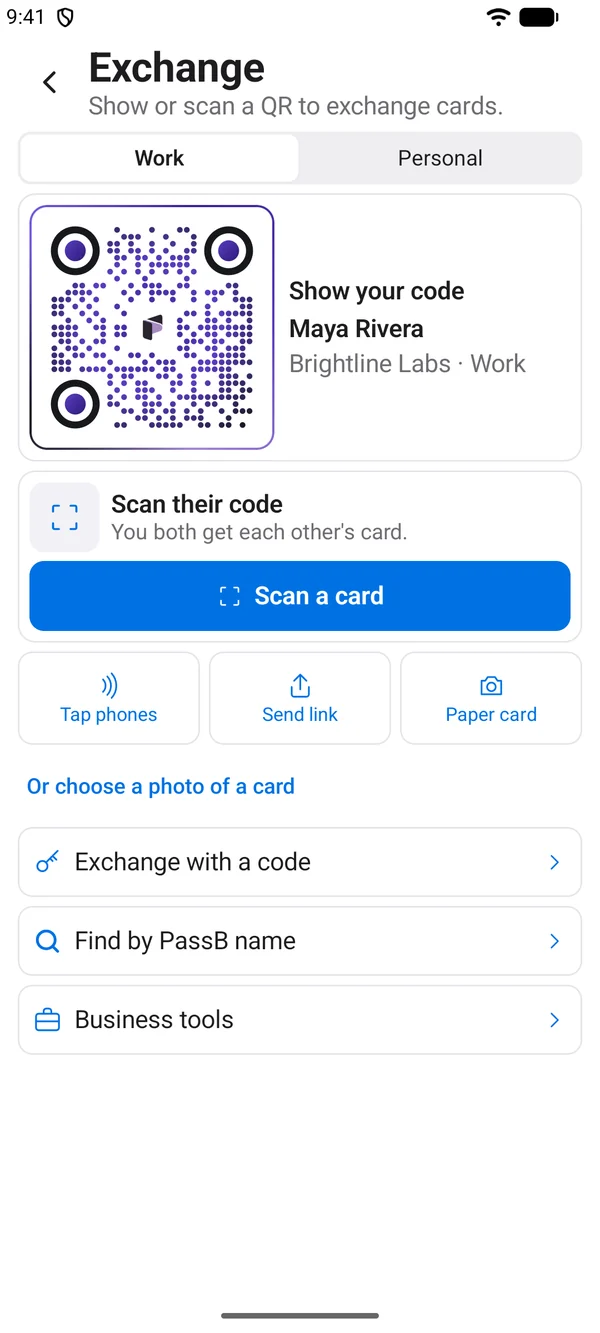
ONE TAP. BOTH CARDS.PassB / in the app
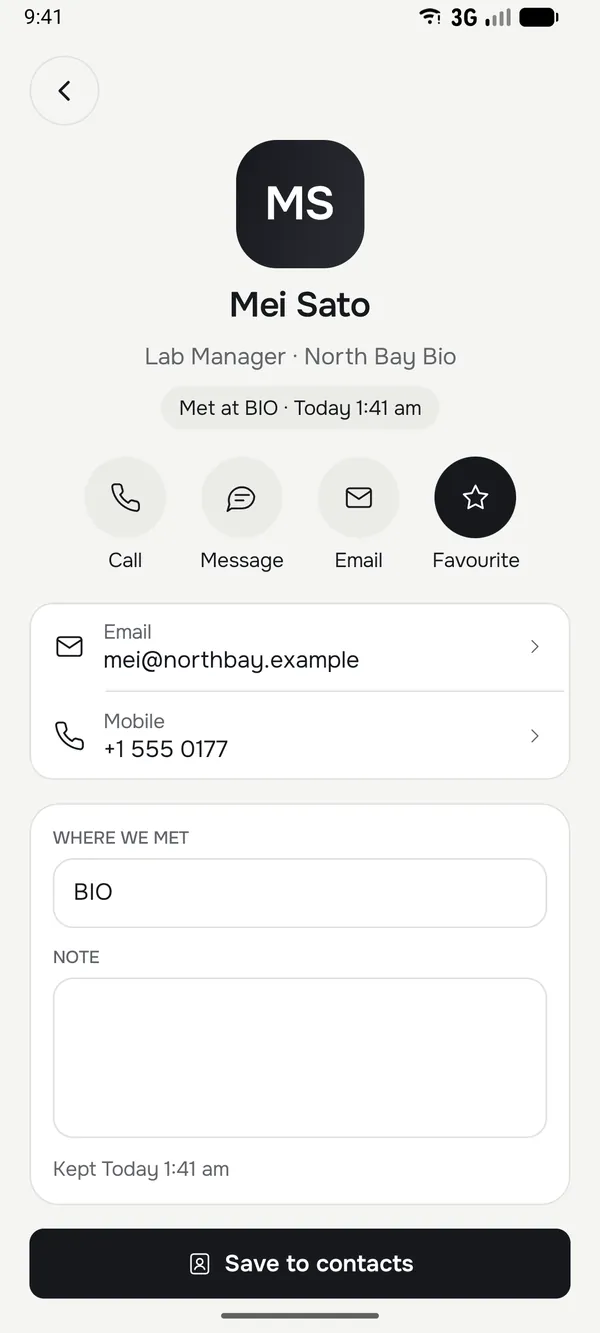
PassB: Exchange cards, Save to contacts only, or Save in PassB onlyA contact in PassB with Call, Message, Email and Favourite buttons
Exchange cardsFree, no limit.

REAL APP SCREENS · EXAMPLE CONTACTS

01 / FREE

Your card. Your start.

Unlimited exchanges and paper-card scans.

$0 to start
02 / PRO

A little more you.

No limit on exchanges or paper-card scans.

$2.99 / month · $19.99 / year
03 / TEAMS

Everyone on brand.

Work-card exchanges with no monthly limit.

$3 / person / month

Paid yearly. From 5 people.

THE FEATURE GUIDE

Every feature.
All in one place.

Free, Pro or Teams.
See what it does, then find it in PassB.

Showing all 48 features

Filters match feature labels. Pro also includes Free features.

01

Share your card

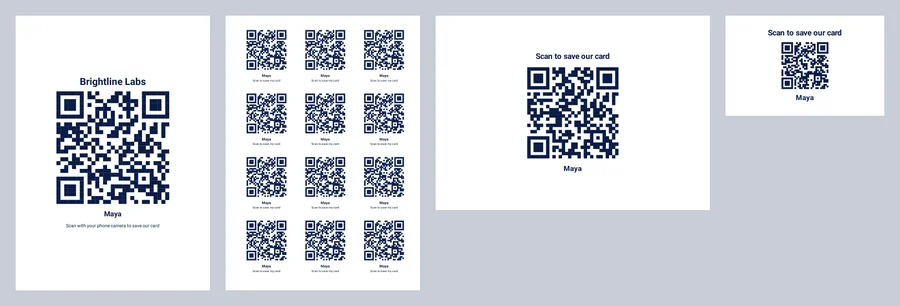
Show it, send it, tap it. The other person never needs the app.
PASSB / YOUR CARD
Maya Rivera

Product designer

A LITTLE OF YOU.
ONE SCAN AWAY.
Example QR linking to PassB
Scan.
Save contact.
Two cards: Work and Personal
Explore 13 features
Free

Two cards: Work and Personal

A Work card for your job and a Personal card for your own life. Each has its own look, Short or Tall. Paper and Graphite are free.

Free

IN THE APPCard tab, pick Work or Personal at the top, then Edit

Make your card
Free

No typing

Make your card by picking yourself from your phone's contacts. Your name, job, phone and email fill in.

Free

IN THE APPCard tab, then Edit, then Use my contact card

Getting started
Free

A QR anyone can scan

They point any phone camera at it and save you. No app, no sign-up.

Free

IN THE APPCard tab: your QR is on the card

How sharing works
Free

Private links you can stop

Share your Work card or your Personal card. Each link works until you stop it.

Free

IN THE APPCard tab, then Share

How links stay private
Free

Send a link

Send your card by WhatsApp, email or text. With Pro, use your own short link.

Free

IN THE APPCard tab, then Share

More about links
Free

Tap phones

Hold two phones together (NFC) to share your card.

Free

IN THE APPCard tab, then Tap

Which phones work
Free

Google Wallet

Add your card to Google Wallet. Your QR is there even when you are offline.

Free

IN THE APPCard tab, then Wallet

More ways to share
Free

Apple Wallet

Add your card to Apple Wallet: PassB colours, your logo beside your name, and your QR even when you are offline.

Free

IN THE APPCard tab, then Wallet

More ways to share
Free

Show on a screen

Your card full screen and bright, for a desk or a stand.

Free

IN THE APPCard tab, then ···, then Show on a screen

See it in use
Free

Office and home address

Add your office address. A home address shows only on your Personal card, never on a work link.

Free

IN THE APPCard tab, then Edit, then How to reach you

Who sees what
Free

Email signature

Your card under every email: a lasting link and a signature ready to paste.

Free

IN THE APPMore, then Email signature

More about links
Free

Home screen widget

Your QR on your home screen, ready in one second.

Free

IN THE APPLong-press your home screen, Widgets, then PassB

Set up the widget
Free

Apple Watch

Your QR on your wrist, ready to scan. Add a watch face with your card: Modular, Infograph or the Card face.

Free

IN THE APPiPhone: More, then Apple Watch faces

More ways to share
Free

LinkedIn banner and call background

Your name, your job and a QR that opens your card, as a LinkedIn banner and a video call background.

Free

IN THE APPMore, Sharing, LinkedIn banner and call background

How sharing works
02

Meet people

Swap cards, read paper cards, and keep every card in your language.
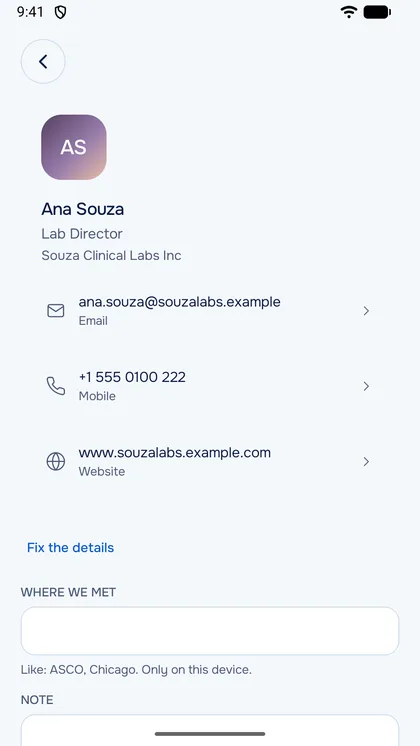
ADA OKAFORLab DirectorPaper card →
PassB reading a paper business card
PassB after exchanging cards: Raj now has your card too
Paper or digital. Keep the connection.
Explore 6 features
FreePro

Exchange cards

When two PassB people meet, one tap swaps both cards. Add where you met and a note. Each card then stays up to date by itself.

Free, no limit

IN THE APPCard tab, then Exchange cards, then scan their QR

How exchange works
FreePro

Read a paper card

Take a photo of a paper business card. Name, job, phone, email and company fill in, on your phone.

Free, no limit

IN THE APPCard tab, then Exchange cards, then Paper card

About paper cards
FreePro

Cards in your language

A card in Hindi, Arabic or Chinese saved in English letters. Pro also translates the job title.

Names free. Pro translates

IN THE APPScan a card, then turn on Save in English

About languages
Free

Contacts, always current

Everyone you met, with where you met and a note. Round buttons to Call, Message, Email and visit their Website. Exchanged cards update themselves.

Free

IN THE APPContacts tab

Who sees your contacts
Free

Save to phone contacts

Put anyone straight into your phone's own contacts.

Free

IN THE APPOpen a person, then Save to phone contacts

Getting started
Free

Cards sent back to you

People who scan you can send their details back. They pick their own contact card: no typing, no app.

Free

IN THE APPContacts tab

How it stays private
Free

Event mode

At a conference, everyone you meet is tagged with the event. See them all, or email them all at once.

Free

IN THE APPContacts tab, Event mode

How exchanging works
03

Keep in touch

See what your card did, and never forget to follow up.
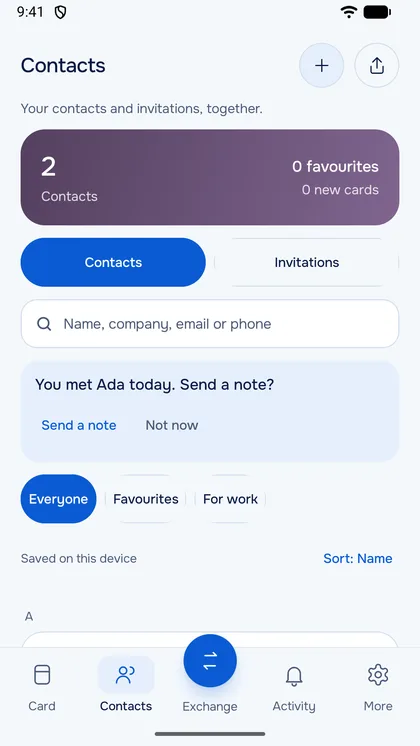
PassB contacts and the Pro reminder to send a note
A note to follow up

You met Ada today.
Send a note?

PRO
An introduction worth remembering.
Explore 4 features
Free

Activity

The people to follow up with this week, every link you shared, how many times it was opened, and Stop.

Free

IN THE APPActivity tab

What Activity shows
Pro

Card insights

How often your card was opened, links working, and cards exchanged.

Pro

IN THE APPActivity tab

About Pro
Pro

A note to follow up

“You met Ada today. Send a note?” opens your mail or messages with a short note ready.

Pro

IN THE APPContacts tab

About Pro
Pro

Contacts to a spreadsheet

Everyone you met as one Excel or CSV file.

Pro

IN THE APPContacts tab, then the share button

About Pro
Pro

The morning-after reminder

At 9 the next morning, a reminder to write to the people you met, with a note ready to send.

Pro

IN THE APPIt comes by itself, from Contacts

About Pro
04

Make it yours

A card that looks like you, in your language.

PASSB / YOUR CARD
Maya Rivera

Product designer

A LITTLE OF YOU.
ONE SCAN AWAY.
Example QR linking to PassB
YOUR DESIGNBold / Black Card
Your details. Your own impression.
Explore 6 features
FreePro

Eight card looks

Paper and Graphite free. Bold, Black Card, Holographic, Editorial, Midnight and Counter with Pro. Company for work cards. Contacts keep the look the sender chose.

2 free. Pro: all

IN THE APPMore, then Change look

See the looks
Free

A card that floats

My card moves softly as you tilt your phone, with a light that slides across it. Full screen and prints stay flat for scanning.

Free

IN THE APPCard tab

See the looks
Free

App colours that match your card

The app wears your card's look: its colours, light or dark. Or pick another look yourself.

Free

IN THE APPMore, then App colour

See the looks
Pro

Design studio

Your colours and gradients, logo, photo, text size and the rows on your card.

Pro

IN THE APPMore, then your card

Try the studio
Pro

Your own link

passb.app/yourname, a short link that is always yours.

Pro

IN THE APPMore, then Your own link

About Pro
Free

PassB in 25 languages

The whole app in your language, from English to Hindi, Telugu, Tamil, Arabic and Japanese.

Free

IN THE APPMore, then Language

Getting started
05

For shops, salons, clinics and stands

Buttons on your card, your card on a TV, and a QR to print.
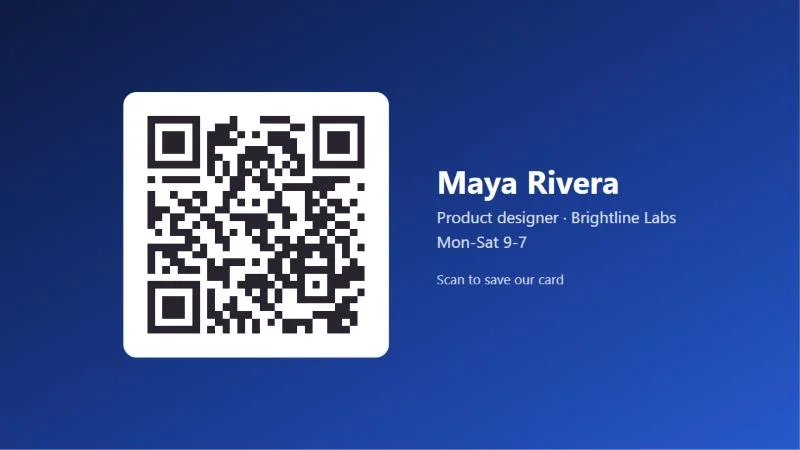
A PassB card and QR on a shop wall TV
PassB poster, sticker sheet, table card and badge on a shop counter
On your wall. On your counter.
Explore 4 features
Free

Shop buttons

Directions, WhatsApp, menu, booking, pay and review us, on your card's page.

Free

IN THE APPMore, then For your business (the Business tab with Pro or Teams)

About shops
Pro

This week's offer

One line on your card and your TV. Change it any time.

Pro

IN THE APPMore, then For your business

About Pro
FreePro

Your card on a TV

Open passb.app/tv on any smart TV and type its code. It shows your QR, hours and offer, and updates itself.

1 TV free. Pro: up to 10

IN THE APPOn the TV: passb.app/tv. In PassB: More, then For your business, then Your card on a TV

Set up a TV
FreePro

Print your QR

A poster, a table card, a sheet of stickers, a badge and a 24 x 36 in banner, ready to print. Pro adds your logo.

Free. Your logo with Pro

IN THE APPMore, then For your business, then Print your QR

See a market stall
06

For companies

PassB Teams: every card your company shares, in one place.

PASSB / YOUR CARD
Ada Okafor

Lab Director

A LITTLE OF YOU.
ONE SCAN AWAY.
Example QR linking to PassB
PASSB / YOUR CARD
Maya Rivera

Product designer

A LITTLE OF YOU.
ONE SCAN AWAY.
Example QR linking to PassB
One company.
One identity.
Everyone on brand.
Explore 5 features
Teams

Company cards

Every employee gets a work card in your logo and colours. Lock the name, address and main phone.

Teams

IN THE APPBusiness tab, then Teams admin, or the admin console on passb.app

Explore Teams
Teams

Unlimited work exchanges

Exchanges with a work card have no monthly limit while your plan is active.

Teams

IN THE APPCard tab, Work card, then Exchange cards

Explore Teams
Teams

Team display

A slideshow of your team on a TV or tablet. One person at a time, each with their photo, name, job and their own QR.

Teams admins

IN THE APPBusiness tab, then Team display

Explore Teams
Teams

Work contacts and reports

See shares, opens and new contacts by person, team or event. Download as CSV.

Teams

IN THE APPAdmin console, then Reports

Teams admin guide
Teams

When someone leaves

Suspend them: every link they shared stops at once, and their work contacts stay with you.

Teams

IN THE APPAdmin console, then People

Teams admin guide
07

Events and invitations

From the first “I'm going” to the welcome at the door.

PASSB / EVENTSGood people.
Great conversations.
Going · Maybe · Can’t attendIllustrative invitation
Illustrative guest QR✓ Welcome
From the invitation to the door.
Explore 4 features
ProTeams

Invitations and RSVP

Personal invitations in Bold, Holographic or Signature. Guests answer Going, Maybe or Can't attend.

Pro (2 a year) and Teams

IN THE APPThe Events tab

How events work
ProTeams

QR passes and a door scanner

Everyone who is going gets a QR pass. Your staff scan it at the door.

Pro and Teams

IN THE APPOpen an event, then Door

How check-in works
Teams

Client meetings

A secure pass for each guest, an agenda and a visitor note. Guests are checked in at the door.

Companies: ask us for a quote

IN THE APPBusiness tab, then Meetings

Explore Teams
Teams

Conferences

A sign-up page, approvals, name badges, sponsors and booth leads, all run from your phone.

Companies: ask us for a quote

IN THE APPBusiness tab, then Conferences

Explore Teams
08

Private by design

You choose what people see, and you can stop any link.

You chooseWork card or Personal card
Share a private linkIt works until you stop it
Stop any linkIt shows nothing from then on
Explore 3 features
Free

Stop any link

One tap and it shows nothing from then on.

Free

IN THE APPActivity tab, then Stop

Security
FreeTeams

Personal stays personal

Your company sees only your work card and work contacts.

Everyone

IN THE APPNothing to set up

Who sees what
Free

No ads

PassB has no ads, and never sells your data.

Free

IN THE APPAlways on

Privacy policy

READY WHEN YOU ARE

Your next connection
starts with you.

Your card is free. Pro is $2.99 a month or $19.99 a year. Teams is $3 a person a month.